
TIREFIT kit version 1
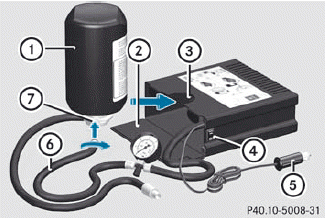
► Open flap 2.
► Pull connector 5 with the cable and hose
6 out of the housing.
► Screw hose 6 onto flange 7 of tire
sealant bottle 1.
► Insert tire sealant bottle : head
downwards into recess 3 of the tire
inflation compressor.

► Remove the cap from valve 9 on the faulty tire.

► Make sure pressure release screw 10 on
pressure gauge 11 is fully closed.
► Screw filler hose 8 onto valve 9.
► Insert connector 5 into the socket in the
footwell of the second row of seats.
 None of the other sockets or cigarette
lighters are designed for operating the tire
inflation compressor.
None of the other sockets or cigarette
lighters are designed for operating the tire
inflation compressor.
► Turn the SmartKey to position
1() in the ignition lock.
► Press on/off switch ? on the tire
inflation
compressor to I.
The tire inflation compressor is switched on. The tire is inflated.
 First, TIREFIT is pumped into the tire. The
pressure can briefly rise to approximately
500 kPa (5 bar/73 psi).
First, TIREFIT is pumped into the tire. The
pressure can briefly rise to approximately
500 kPa (5 bar/73 psi).
Do not switch off the tire inflation compressor during this phase.
► Allow the tire inflation compressor to run for five minutes. The tire should then have attained a pressure of at least 180 kPa (1.8 bar/26 psi).
Do not operate the tire inflation
compressor for longer than eight minutes
at a time without a break. It may otherwise
overheat.
The tire inflation compressor can be operated again once it has cooled down.
If a pressure of 180 kPa (1.8 bar/26 psi) has been achieved after five minutes, see.
If a pressure of 180 kPa (1.8 bar/26 psi) has not been achieved after five minutes, see.
See also:
Storing the current speed or calling up the last stored speed
WARNING
The set speed stored in memory should only be set again if prevailing road conditions
and legal speed limits permit. Possible acceleration or deceleration differences
arising from re ...
Front air bags
The front air bags increase protection for the
driver's and front-passenger's head and
chest.
Driver's air bag 1 deploys in front of the
steering wheel; front-passenger front air
bag 2 depl ...
Cargo compartment enlargement
Important safety notes
WARNING
Always lock the seat backrest in its upright position when the rear seat bench
is occupied, or the extended cargo volume is not in use.
Check for secure lockin ...