
KEYLESS-GO
General information
Vehicles with KEYLESS-GO are equipped with a SmartKey featuring an integrated KEYLESS-GO function and a detachable Start/Stop button.
The Start/Stop button must be inserted into the ignition lock and the SmartKey must be in the vehicle.
Pressing the Start/Stop button several times in succession corresponds to the different SmartKey positions in the ignition lock. This is only the case if you are not depressing the brake pedal.
If you depress the brake pedal and press the Start/Stop button, the engine starts immediately.
The Start/Stop button can be removed from the ignition lock. Then, you can insert the SmartKey into the ignition lock.
 You do not have to remove the Start/Stop
button from the ignition lock when you
leave the vehicle. However, you should
always take the SmartKey with you when
leaving the vehicle. The vehicle can be
started with the Start/Stop button and the
electrical equipment can be operated while
the SmartKey is in the vehicle.
You do not have to remove the Start/Stop
button from the ignition lock when you
leave the vehicle. However, you should
always take the SmartKey with you when
leaving the vehicle. The vehicle can be
started with the Start/Stop button and the
electrical equipment can be operated while
the SmartKey is in the vehicle.
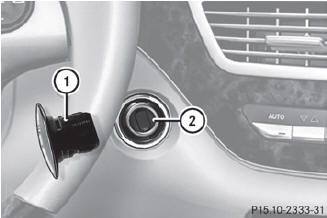
1 Start/Stop button
2 Ignition lock
 Insert Start/Stop button 1 into ignition
lock 2.
Insert Start/Stop button 1 into ignition
lock 2.
When you insert Start/Stop button 1
into ignition lock 2, the system requires a
detection time of approximately two
seconds before you can use Start/Stop
button 1.

Start/Stop button
3 USA only
4 Canada only
Position 0: if Start/Stop button 1 has not
yet been pressed, this corresponds to the
SmartKey being removed from the ignition.
Position 1: press Start/Stop button 1.
You can now activate the windshield wipers, for example.
If you then open the driver's door when in
this position, the power supply is
deactivated.
Position 2 (ignition): press Start/Stop
button 1 twice.
If you press Start/Stop button 1 once
when in this position and the driver's door
is open, the power supply is deactivated
again.
As soon as the ignition is switched on, all the indicator lamps in the instrument cluster light up. If an indicator lamp does not go out after the engine is started or if it lights up while the vehicle is in motion.
See also:
Cleaning the paintwork
Scratches, corrosive deposits, areas affected
by corrosion and damage caused by
inadequate care cannot always be completely
repaired. In such cases, visit a qualified
specialist workshop, e.g. ...
Internet
Further information about Mercedes-Benz
vehicles and about Daimler AG can be found
on the following websites:
http://www.mbusa.com (USA only)
http://www.mercedes-benz.ca (Canada
only) ...
Active Lane Keeping Assist
Important safety notes
Active Lane Keeping Assist monitors the area
in front of your vehicle by means of a camera
at the top of the windshield. Active Lane
Keeping Assist detects lane markings ...